
In order for Repricer to start repricing your products, you need to set the minimum and maximum prices for your offers. The Min Price is the lowest price you are willing to sell your product for. The Max Price is the highest price you are willing to sell your product for. Repricer will not reprice your offer without both Min and Max Prices being set.
The Repricing page lists all the offers you have added to the Repricer. To set or adjust the minimum or maximum price, click the edit button on the right side of the offer you want to change and enter the new value. Once you have set the value, click the Update button to save the changes.
Caution: The minimum price will not save if it has been set above the maximum price. The maximum price will not save if it has been set below the minimum price.
When the adjustment has been successful a "Success" message will appear. If the adjustment has failed an "Error" message will appear.
Make sure to enable the Repricing Status toggle to start repricing your offer.

Setting Min and Max Prices
Repricer allows you to adjust your Min and Max Prices on your mobile or tablet device. The mobile layout of the Repricing page differs to when it is viewed on desktop.
To adjust your Min or Max price click the Edit Icon to the right of the offer you want to adjust. This will open the Offer Details Modal for that offer. Adjust the Min and Max values and click the Update Repricing button to save the changes.
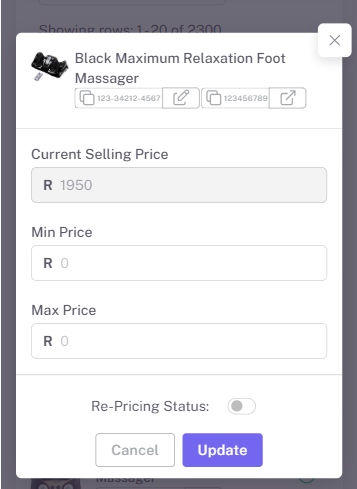
Setting Min and Max Prices on mobile device